> ## Documentation Index
> Fetch the complete documentation index at: https://help.bilopt.com/llms.txt
> Use this file to discover all available pages before exploring further.

# 架台を配置する

<Note>
  架台配置機能をご希望の場合はサポートまでお問い合わせください。
</Note>

## 設置条件を指定する

ツールバーのパネルアイコンをクリックすると、太陽光パネルの配置画面に変わります。
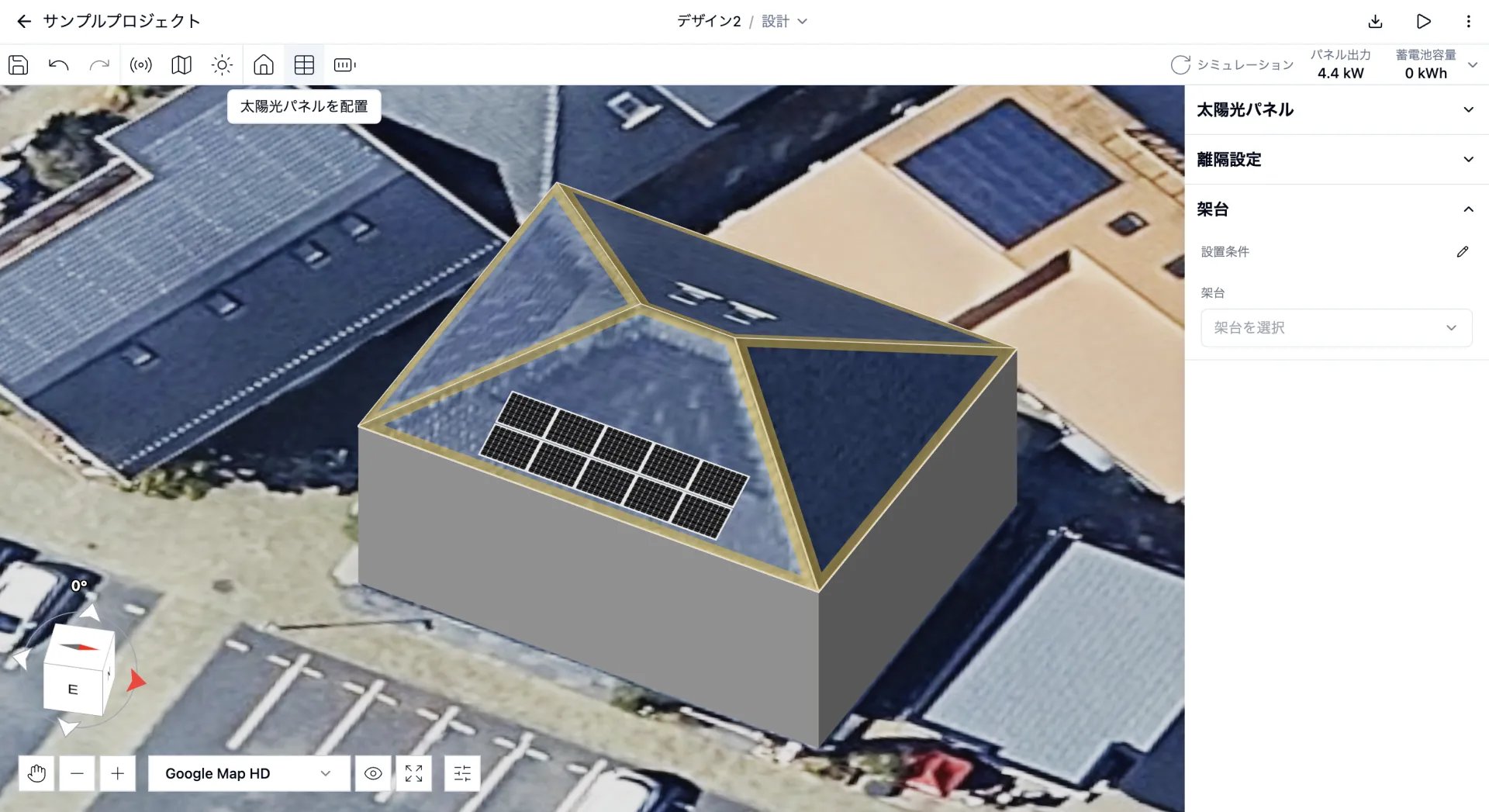
<img src="https://mintcdn.com/bilopt/b8ieqM7ZFsn7V_IQ/images/help/design/place-mounting-systems-01.webp?fit=max&auto=format&n=b8ieqM7ZFsn7V_IQ&q=85&s=d616300a6826a7cc9aab56ecc142eb6f" alt="架台の設定を表示した太陽光パネルの配置画面" width="1920" height="1047" data-path="images/help/design/place-mounting-systems-01.webp" />

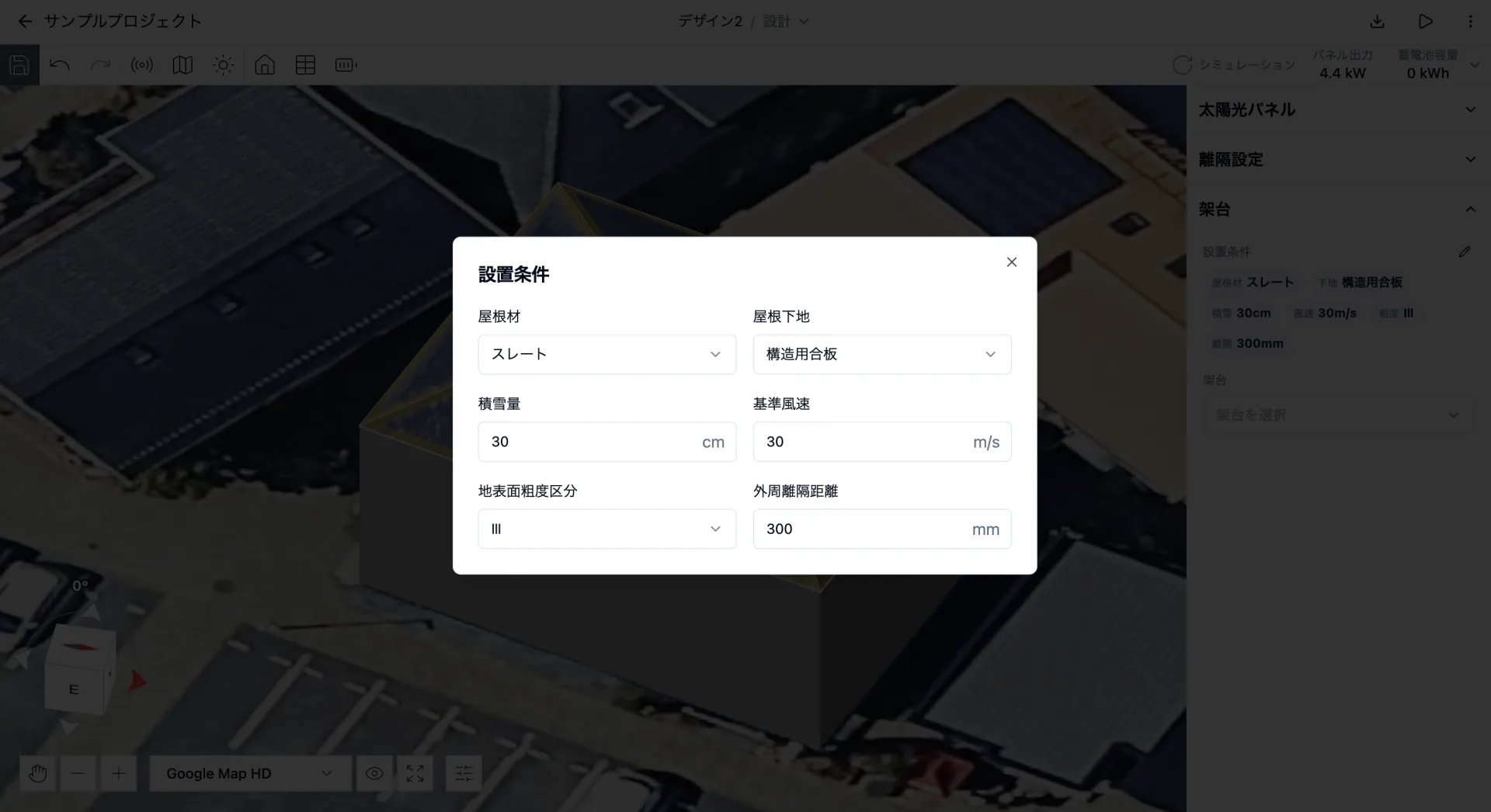
架台の設置条件の編集アイコンをクリックし、以下の条件を指定します。

<img src="https://mintcdn.com/bilopt/b8ieqM7ZFsn7V_IQ/images/help/design/place-mounting-systems-02.webp?fit=max&auto=format&n=b8ieqM7ZFsn7V_IQ&q=85&s=fc71d265b2921af4dd0f3d52cf926599" alt="屋根材、屋根下地、積雪量、基準風速などを指定する設置条件ダイアログ" width="1920" height="1046" data-path="images/help/design/place-mounting-systems-02.webp" />

| 条件 | 説明 |
| - | - |
| 屋根材 | スレートや瓦などの屋根材を選択します。 |
| 屋根下地 | 構造用合板などの屋根下地を選択します。 |
| 積雪量 | 設置地域の積雪量を入力します。 |
| 基準風速 | 設置地域の風速を入力します。 |
| 地表面粗度区分 | 設置地域の地表面粗度区分を選択します。 |
| 外周離隔距離 | 屋根の外周から太陽光パネルまでの距離を入力します。 |

以下の条件は、太陽光パネルを配置した屋根面から自動で取得されます。

| 条件 | 説明 |
| - | - |
| 傾斜 | 設置屋根面の屋根傾斜から決まります。 |
| 高さ | 設置屋根面の最大高さから決まります。 |

## 架台を配置する

架台のセレクトボックスを開くと、設置条件に適合する架台を選択できます。
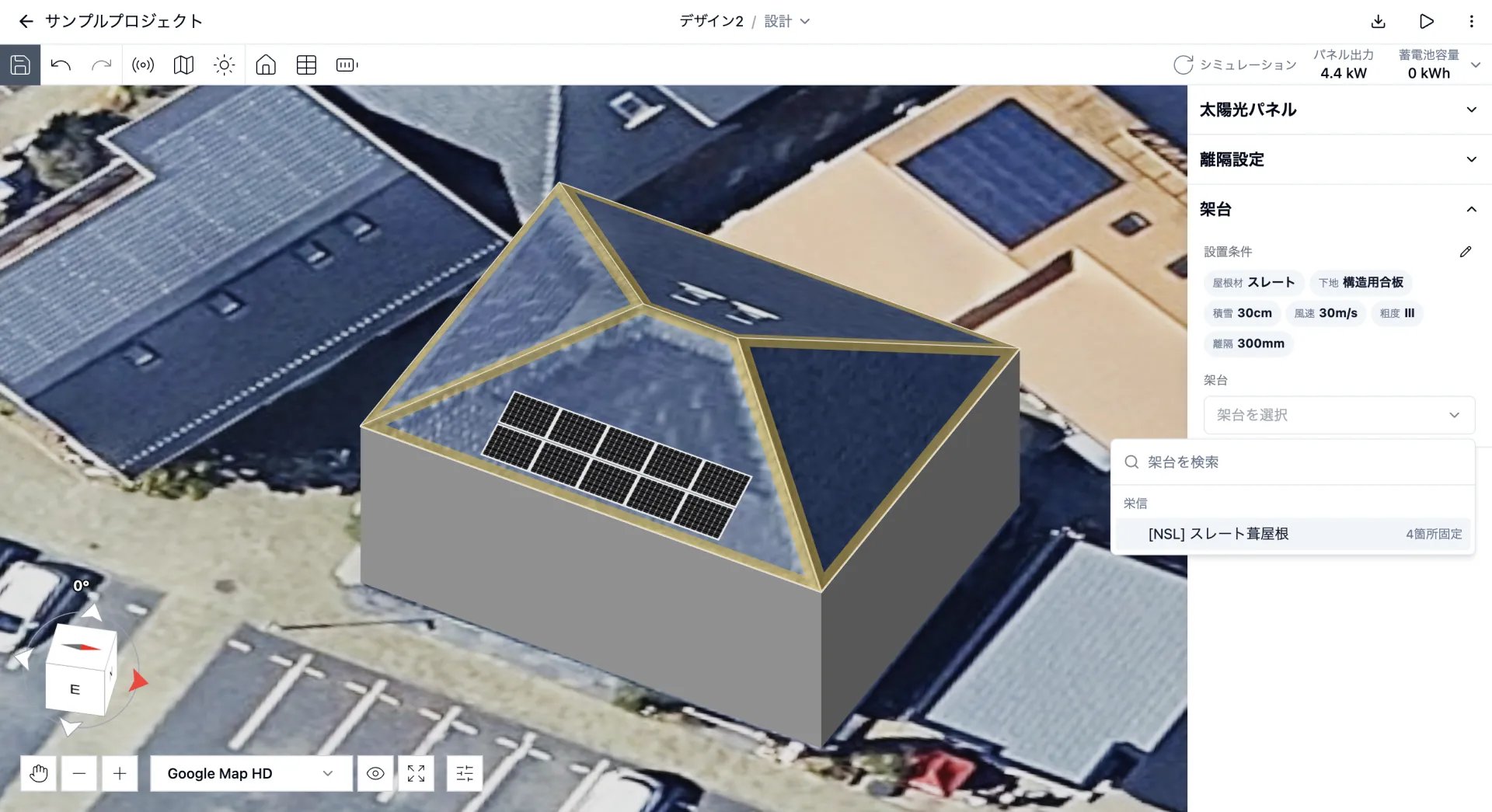
<img src="https://mintcdn.com/bilopt/b8ieqM7ZFsn7V_IQ/images/help/design/place-mounting-systems-03.webp?fit=max&auto=format&n=b8ieqM7ZFsn7V_IQ&q=85&s=d54060387e075dfaa9fbe7db91c92309" alt="設置条件に適合する架台を選ぶセレクトボックス" width="1920" height="1045" data-path="images/help/design/place-mounting-systems-03.webp" />

施工区分の初期設定は「自動」です。区分表に従い、設置条件に応じた施工区分が自動で割り当てられます。
施工区分を手動で選択することもできます。
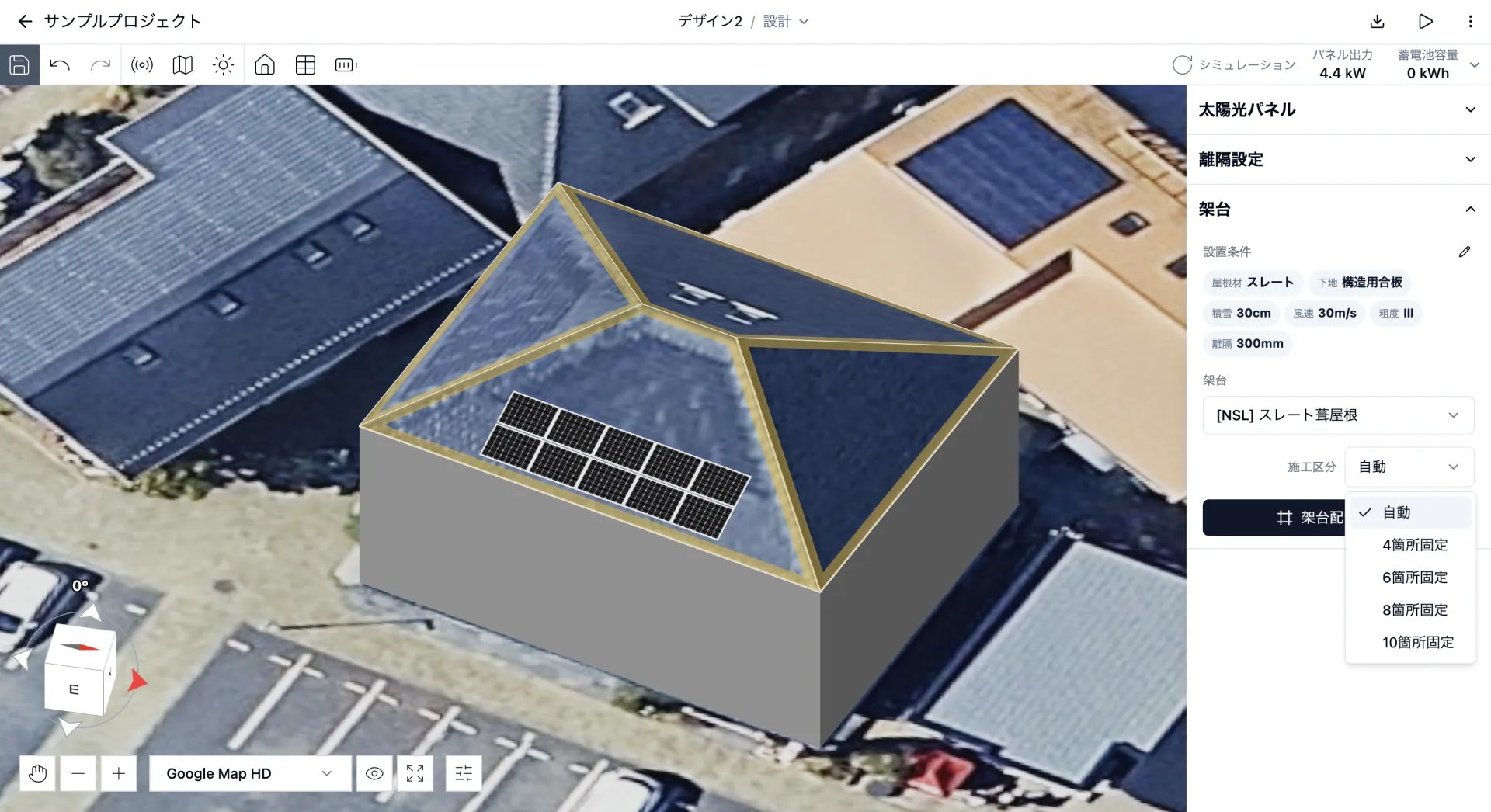
<img src="https://mintcdn.com/bilopt/b8ieqM7ZFsn7V_IQ/images/help/design/place-mounting-systems-04.webp?fit=max&auto=format&n=b8ieqM7ZFsn7V_IQ&q=85&s=4dac8f3f5d53a350e8cb6dc337db0e94" alt="自動または固定箇所数から施工区分を選ぶセレクトボックス" width="1920" height="1046" data-path="images/help/design/place-mounting-systems-04.webp" />

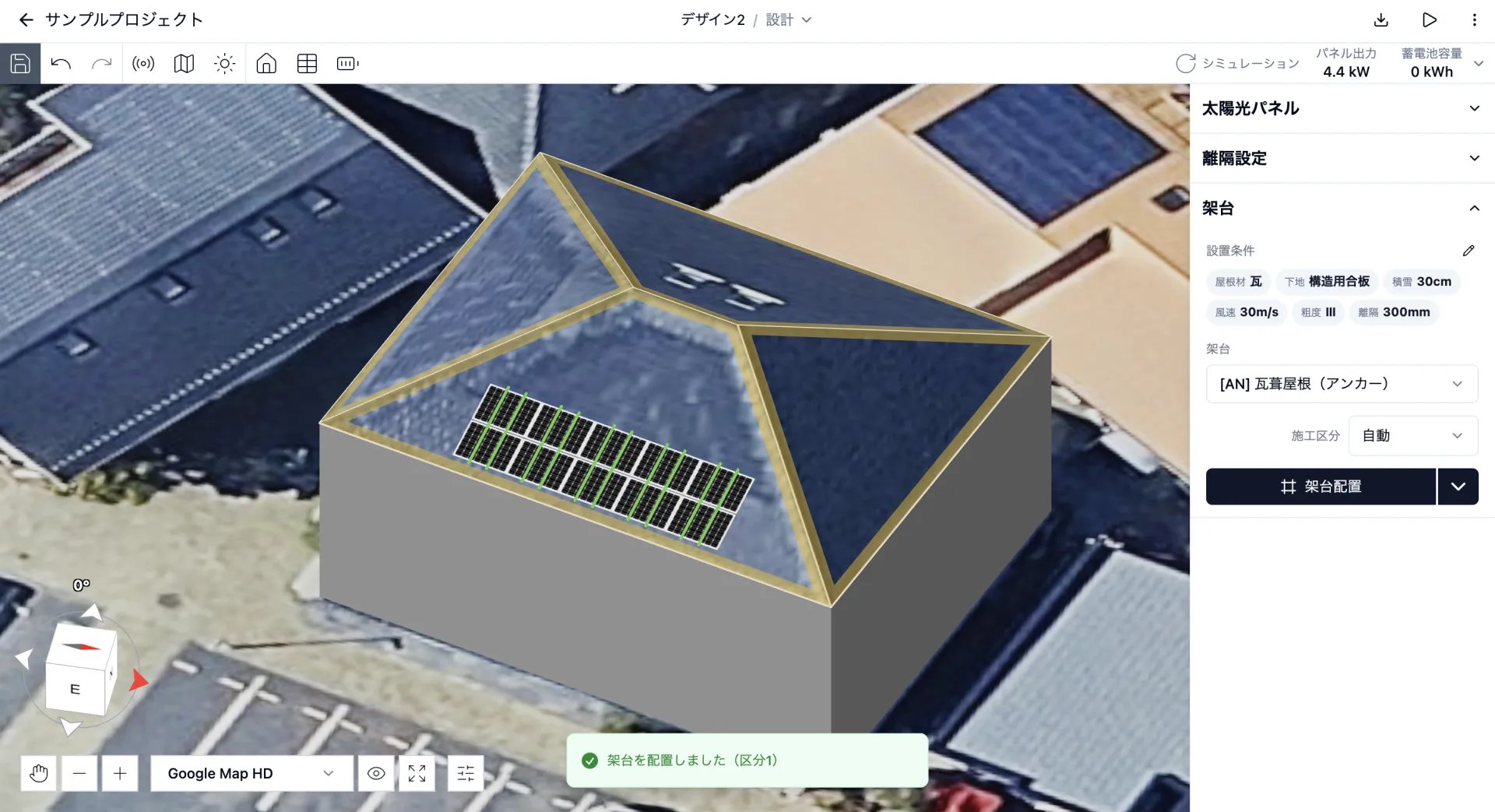
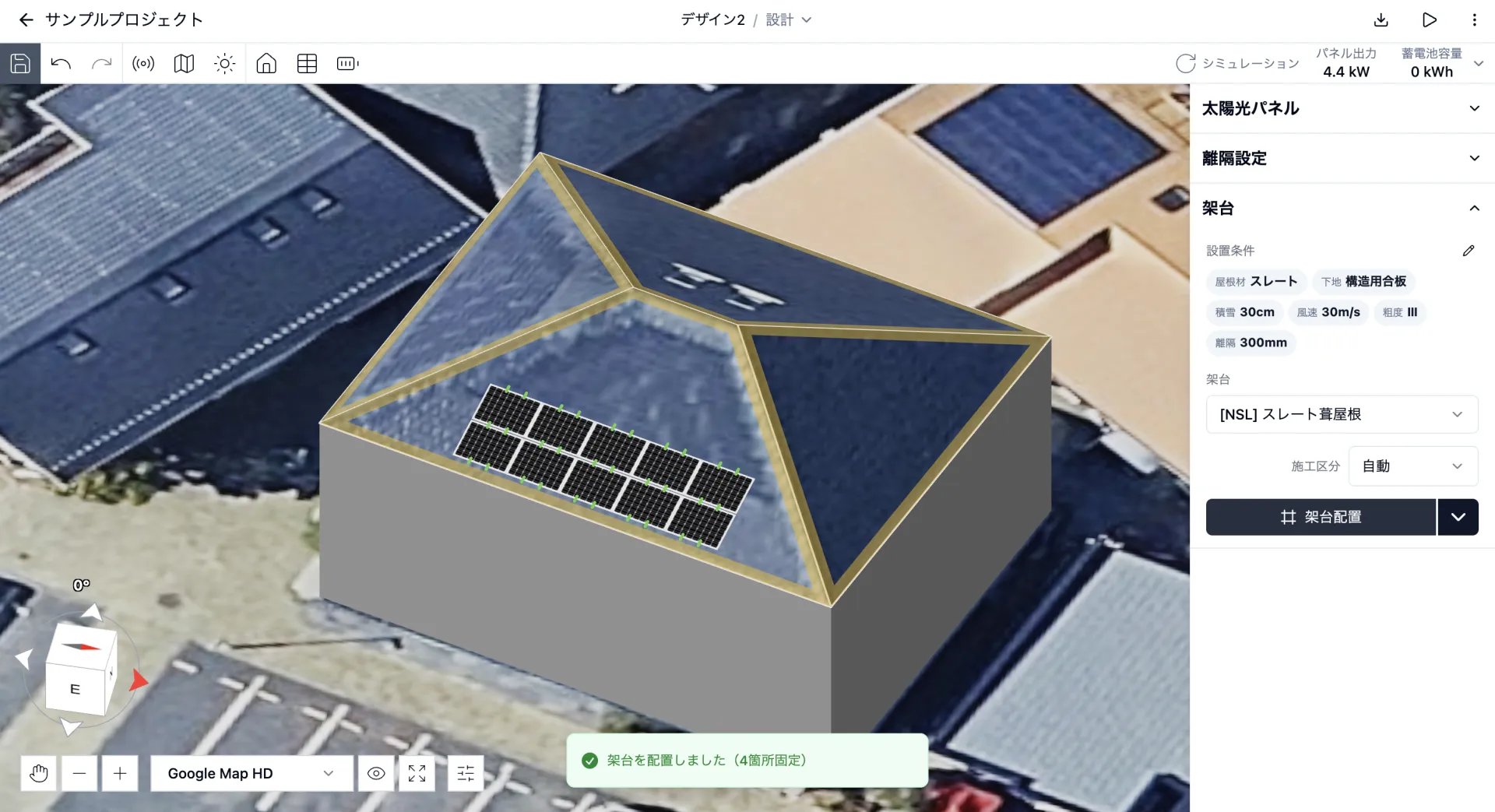
「架台配置」をクリックすると、架台が配置されます。ラックレス架台では固定金具の位置が、ラック架台ではラックが緑色で表示されます。
<Columns cols={2}>
  <Column>
    <Frame caption="ラックレス架台">
      <img src="https://mintcdn.com/bilopt/b8ieqM7ZFsn7V_IQ/images/help/design/place-mounting-systems-05.webp?fit=max&auto=format&n=b8ieqM7ZFsn7V_IQ&q=85&s=b4128919fbef3dc3133563aae82edf5b" alt="ラックレス架台の固定金具が緑色で表示された太陽光パネル" width="1920" height="1043" data-path="images/help/design/place-mounting-systems-05.webp" />
    </Frame>
  </Column>

  <Column>
    <Frame caption="ラック架台">
      <img src="https://mintcdn.com/bilopt/b8ieqM7ZFsn7V_IQ/images/help/design/place-mounting-systems-06.webp?fit=max&auto=format&n=b8ieqM7ZFsn7V_IQ&q=85&s=3a88a16c61a40db6fd69bc4845ff5bba" alt="ラック架台のラックが緑色で表示された太陽光パネル" width="1920" height="1043" data-path="images/help/design/place-mounting-systems-06.webp" />
    </Frame>
  </Column>
</Columns>

## 架台を編集する

「架台配置」の右側にあるメニューから「編集」を選択すると、手動編集モードに切り替わります。
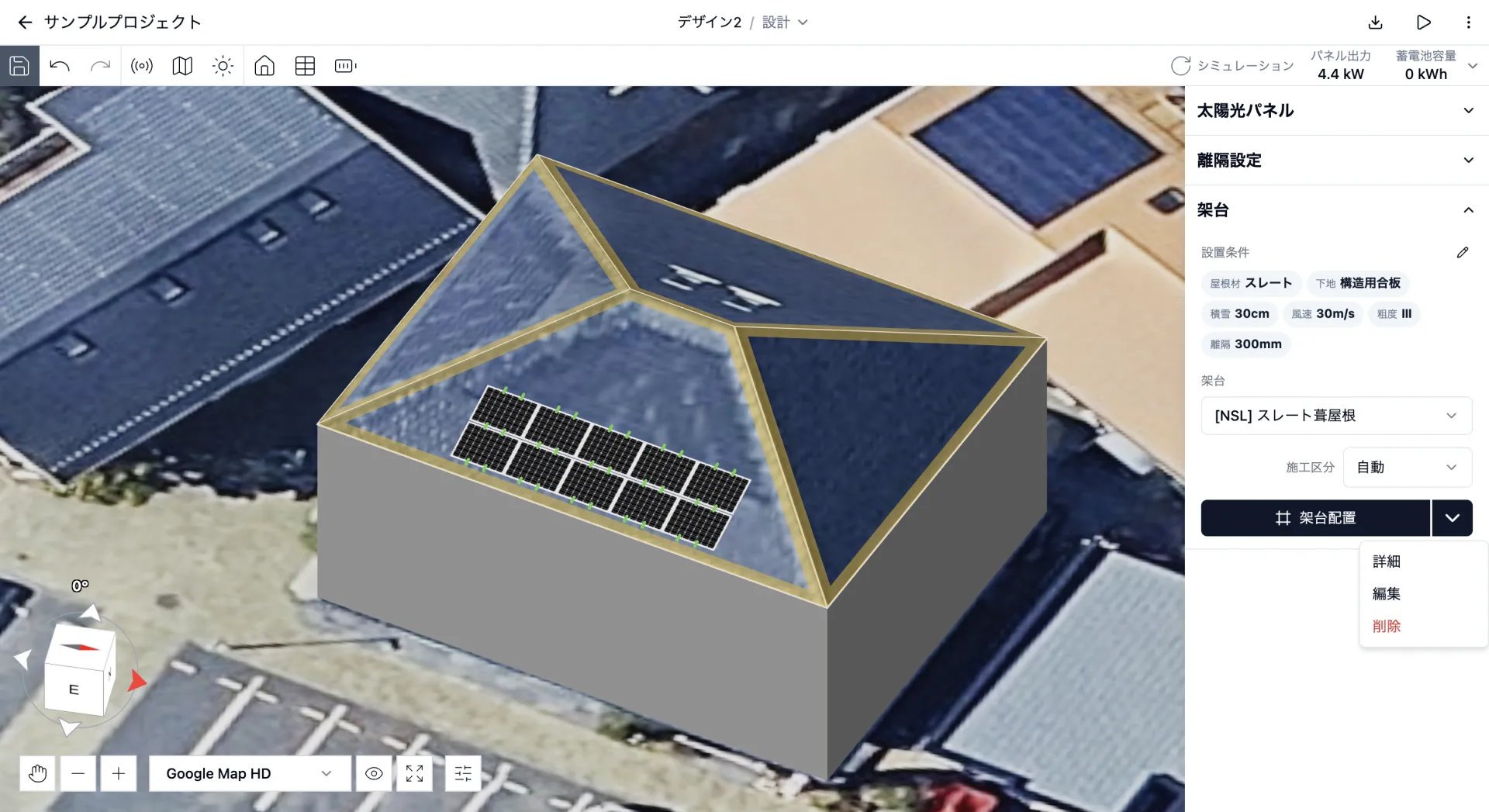
<img src="https://mintcdn.com/bilopt/b8ieqM7ZFsn7V_IQ/images/help/design/place-mounting-systems-07.webp?fit=max&auto=format&n=b8ieqM7ZFsn7V_IQ&q=85&s=8ec0aa0eca271a07c2bce1f7007b5d8d" alt="架台配置のメニューに表示された詳細、編集、削除の項目" width="1920" height="1047" data-path="images/help/design/place-mounting-systems-07.webp" />

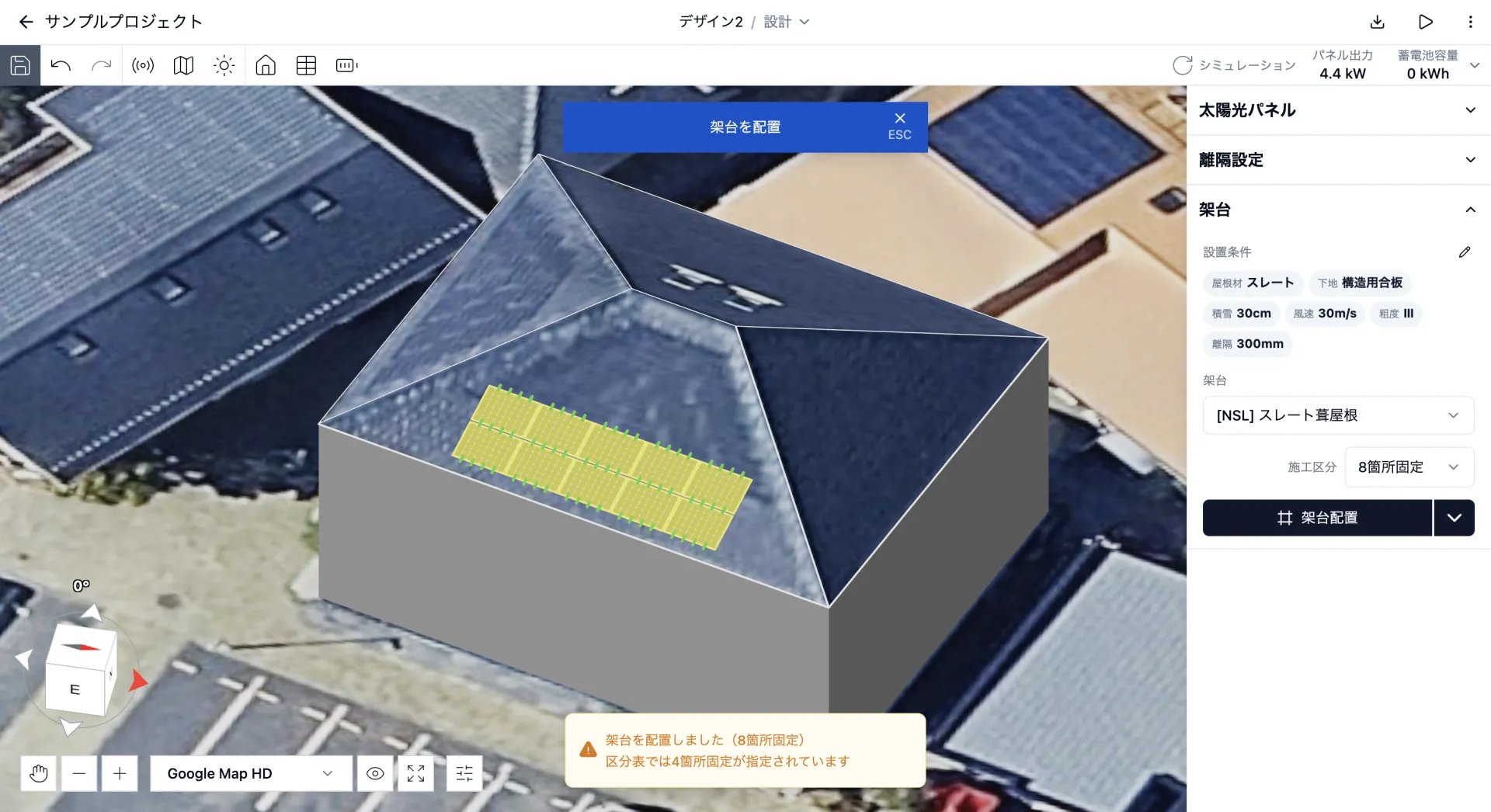
パネルのまとまり（島）ごとに、架台や施工区分を変更しながら配置できます。区分表と異なる施工区分を選択すると、パネルが黄色になり、画面下部に警告が表示されます。
<img src="https://mintcdn.com/bilopt/b8ieqM7ZFsn7V_IQ/images/help/design/place-mounting-systems-08.webp?fit=max&auto=format&n=b8ieqM7ZFsn7V_IQ&q=85&s=4ccdfa715a344a859218e9bdac8d2489" alt="区分表と異なる施工区分で配置した太陽光パネルが黄色で表示された画面" width="1920" height="1046" data-path="images/help/design/place-mounting-systems-08.webp" />

## 架台図を表示する

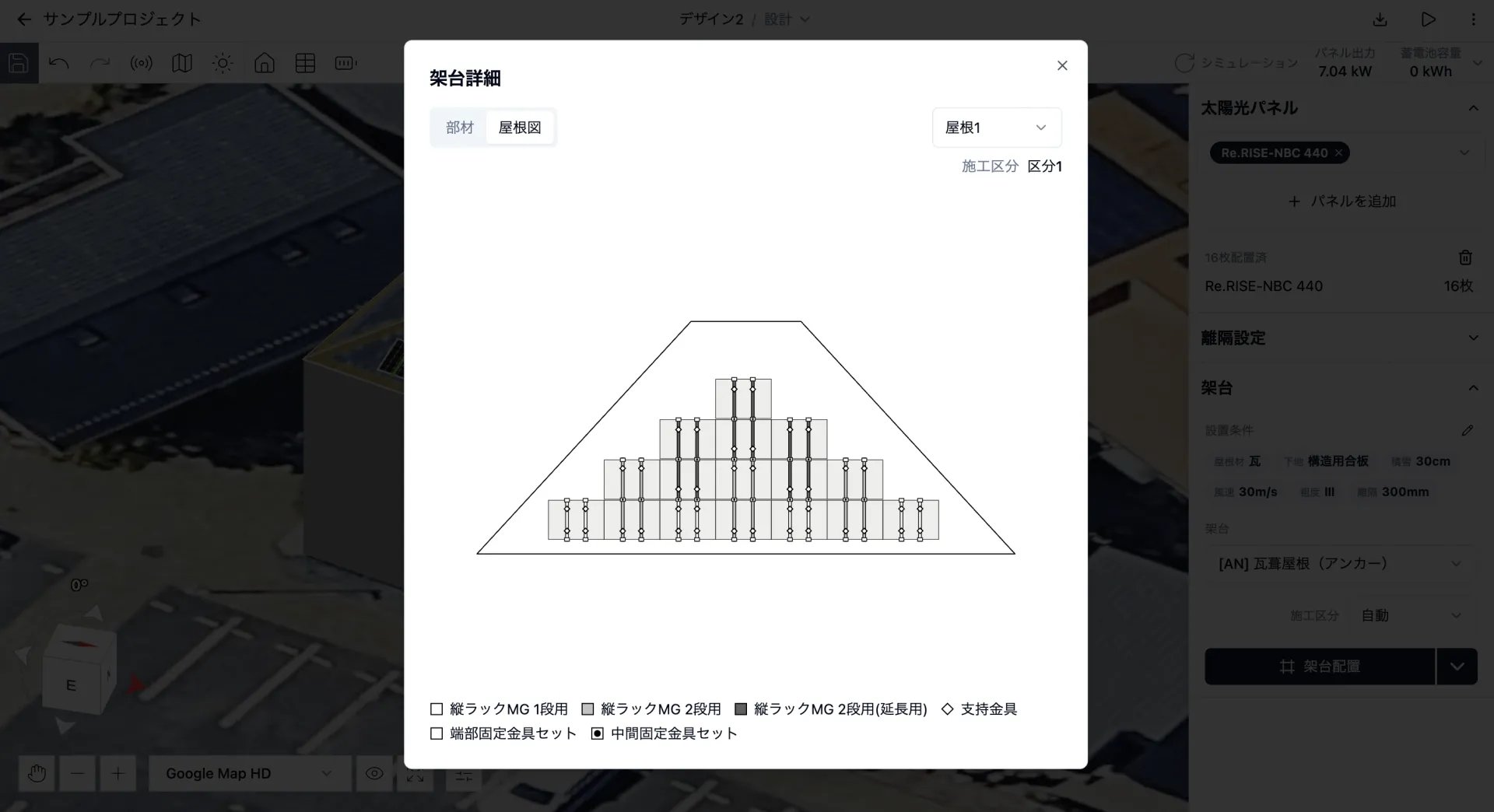
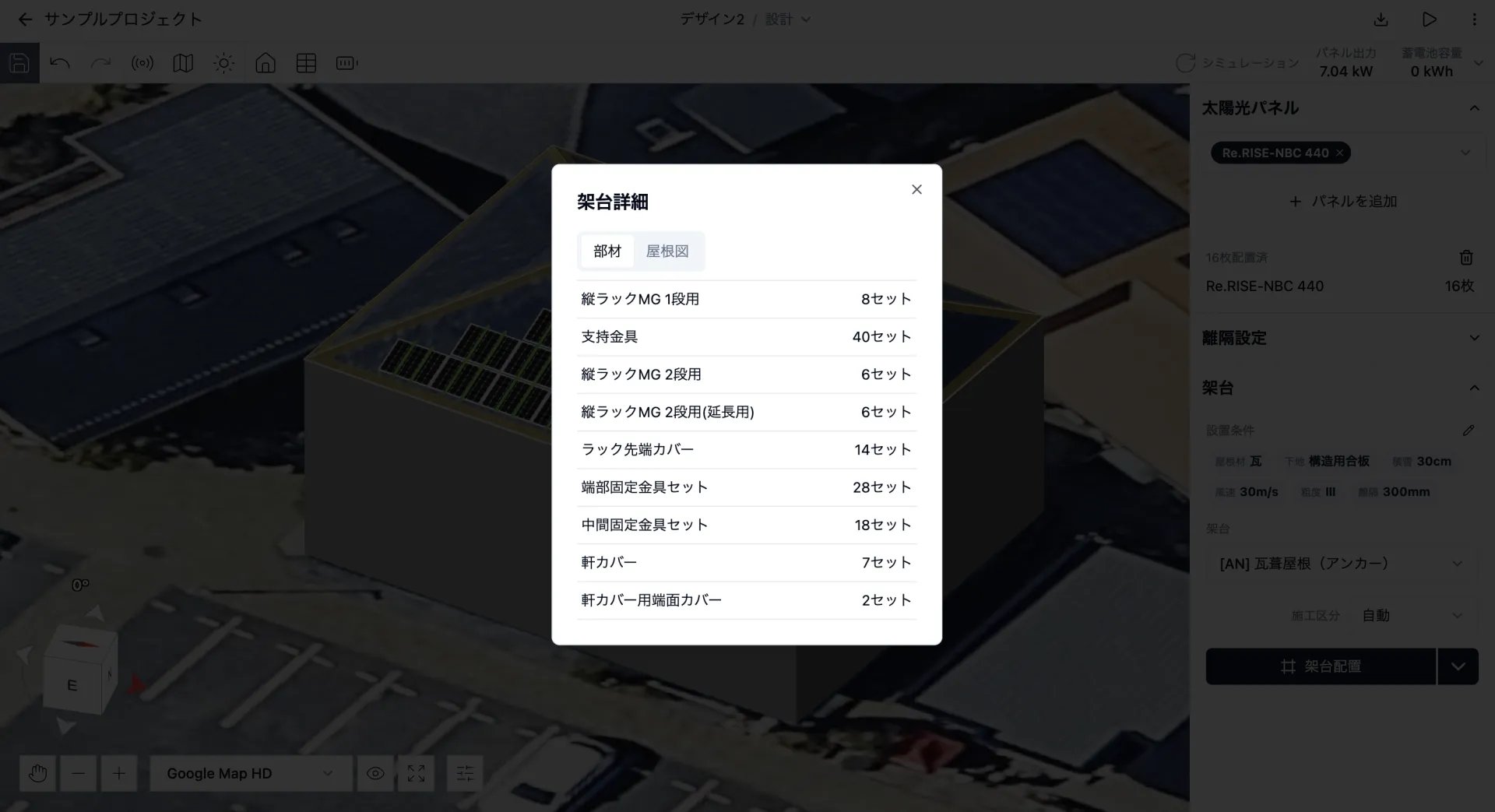
「架台配置」の右側にあるメニューから「詳細」を選択すると、部材表と架台図を確認できます。
<Columns cols={2}>
  <Column>
    <Frame caption="部材表">
      <img src="https://mintcdn.com/bilopt/b8ieqM7ZFsn7V_IQ/images/help/design/place-mounting-systems-09.webp?fit=max&auto=format&n=b8ieqM7ZFsn7V_IQ&q=85&s=732cd4c1f37c8598b7b17e588e646534" alt="架台に必要な部材と数量を表示した部材表" width="1920" height="1043" data-path="images/help/design/place-mounting-systems-09.webp" />
    </Frame>
  </Column>

  <Column>
    <Frame caption="架台図">
      <img src="https://mintcdn.com/bilopt/b8ieqM7ZFsn7V_IQ/images/help/design/place-mounting-systems-10.webp?fit=max&auto=format&n=b8ieqM7ZFsn7V_IQ&q=85&s=a7cf877514bb990086ff0694c6c33ca6" alt="屋根面に配置された架台と部材の位置を示す架台図" width="1920" height="1044" data-path="images/help/design/place-mounting-systems-10.webp" />
    </Frame>
  </Column>
</Columns>

## 架台を削除する

「架台配置」の右側にあるメニューから「削除」を選択すると、配置した架台をすべて削除できます。


This documentation is built and hosted on [Mintlify](https://mintlify.com), a developer documentation platform.